Skip to content

For people who resell on Vinted, with 1 account or 50

The margin next to the price. Stock that restocks itself.

It runs in your browser, with the session you already have open. It knows what each piece cost you, gets the replacement ready for whatever sells, and relists what has gone stale at the pace of a person. At the first captcha it stops and tells you. Made by someone who resells, for people who resell.

It isn't on the Chrome Web Store yet. You write to ola@stoqzy.com saying how many accounts you have and which country you're in, and you get the extension file with the instructions. The person who wrote the code answers. No card on the free plan.

Fig. 1 In eleven seconds: the margin, the stock that comes back, the human pace.see the real screenshots ↓
21Vinted countries, every item in its own currency
24actions a day on the Balanced pace; never more than 60
20photo profiles, so a relist never repeats the same image
0captchas bypassed. It stops and tells you.
What it isA Chrome extension. It opens next to Vinted and uses the session you already have open.
Who it's forPeople who resell, with one account or with many. People who have costs and want to know what they earn.
Who made itA Vinted reseller, fed up with a commercial extension that duplicated listings. He uses it on his own accounts every day.
StatusIn daily use on the author's accounts. Relisting proven live; restocking sold items in testing. Not on the Chrome Web Store: you ask for access by email and install it yourself.

01 · What it does

Everything you used to do by hand, with the cost sheet next to it.

Vinted shows you the price. Stoqzy shows you what's left. From there, each tool does one concrete thing: restock, relist, reply, ship. The screenshots are real, from a test account with three items.

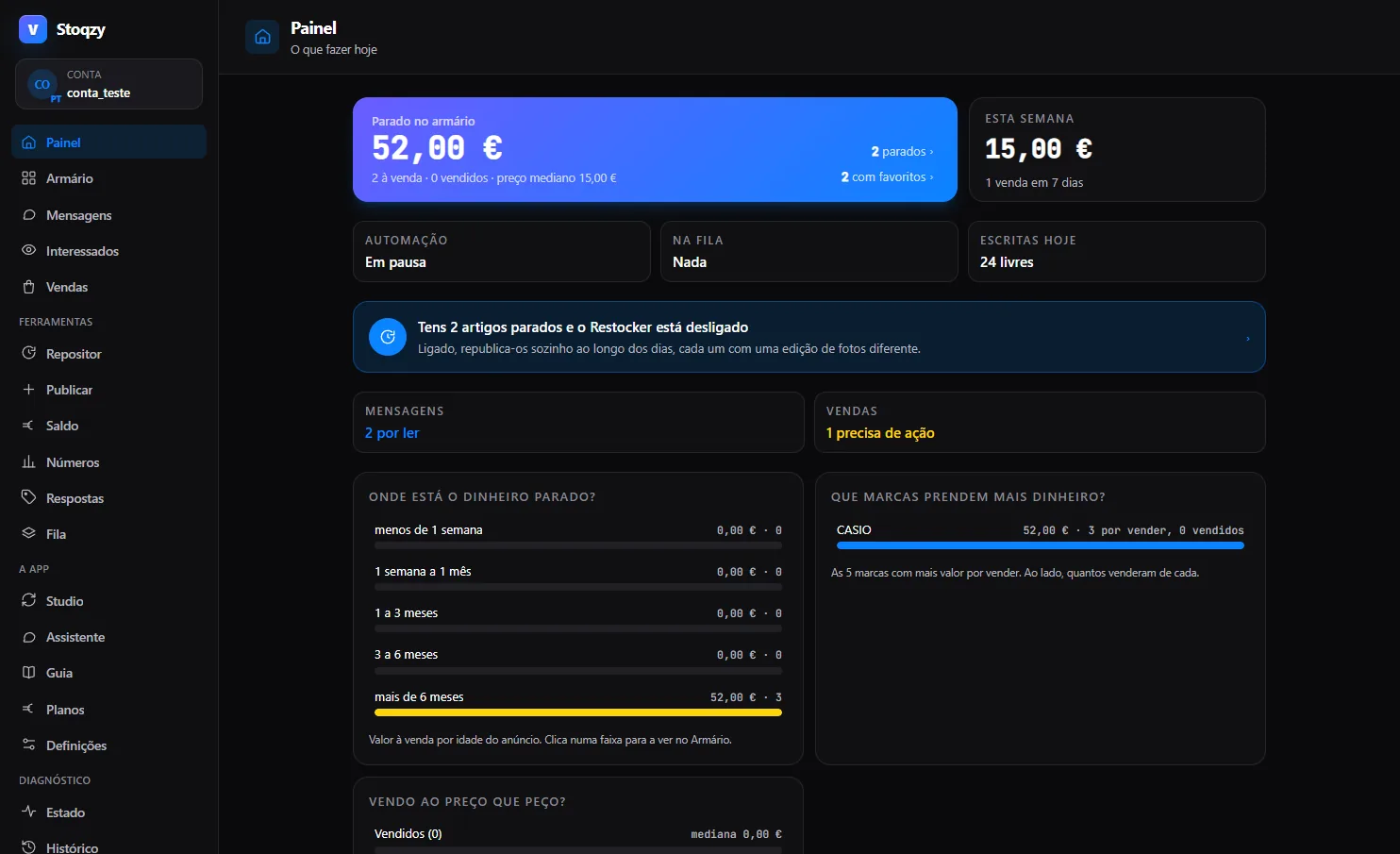
The Stoqzy home screen: money sitting in the wardrobe, sales this week, the state of the automation and the queue, and a warning that 2 items have gone stale with the Restocker switched off
Fig. 2 Home. The extension as it opens in Chrome, next to Vinted: what has gone stale, what sold, and what the queue will do next.real screenshot · test account
1.1

A wardrobe with a record per item

Cards or a table, whichever you prefer. On each listing you add a SKU, a cost and where it's stored. The real margin shows up next to the price, and CSV goes in and out whenever you want.

  • aEdit without leaving. Price, title and description. After saving, the extension reads the listing again and confirms that only what you asked for changed.
  • bHide and unhide in bulk, to pull whatever you don't want to sell this week out of your catalogue.
  • cPhotos with 12 styles and pixel touch-ups in the editor. Every relist goes out with one of 20 editing profiles (framing, tilt, mirror, colour) that item hasn't had yet, so the photo doesn't come out identical to last time.
Fig. 3 A record per item: SKU, cost, location, and the margin appearing next to the price.animation
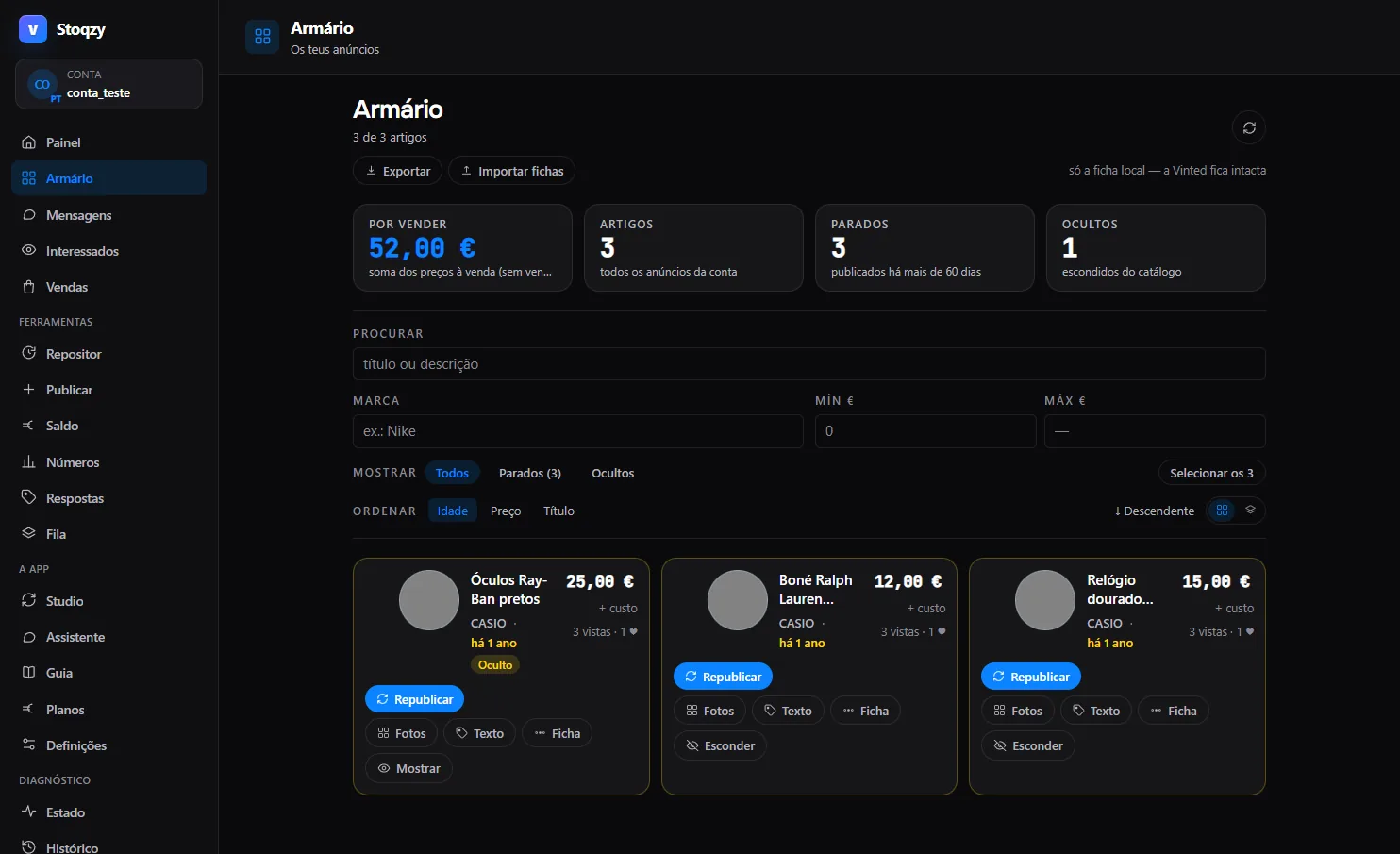
The Stoqzy wardrobe as a grid of cards: each item with price, cost, listing age and Relist, Photos, Text, Record and Hide buttons
Fig. 4 Wardrobe in cards. Three items, €52.00 still unsold, all stale for more than 60 days; one of them hidden.there's a table view too
1.2

Restocker: stock, stale, sold, prices

Vinted has no stock: once it sells, it's gone. Here you mark each product as “restock” and say how many units you have. When that product sells, the listing is created again, as soon as the sale shows up or only once it's completed, your choice, and the quantity drops by one. Relisting stale items is proven live; restocking sold ones uses the same path and is in testing on our own account.

  • 1Stock per product. SKU, restock, quantity N or unlimited.
  • 2Relist the stale ones. A new listing, and the old one is hidden in the same operation. Never two on sale at the same time.
  • 3Put the sold ones back. As soon as the sale shows up (sold today, listed today) or only once it's completed, your choice. A cancelled sale never creates a duplicate on its own: Vinted doesn't relist it, and the cancellation goes through you.
  • 4Slow price drops, with a floor. Cautious, Balanced and Active modes.

What it doesn't do: it doesn't delete listings (only what we've confirmed in real traffic gets built, and deleting isn't confirmed yet) and it doesn't relist in bursts. Every action joins the queue and waits its turn.

Fig. 5 Stock by SKU: it sold, and the listing comes back with new photos; the quantity drops by one.animation
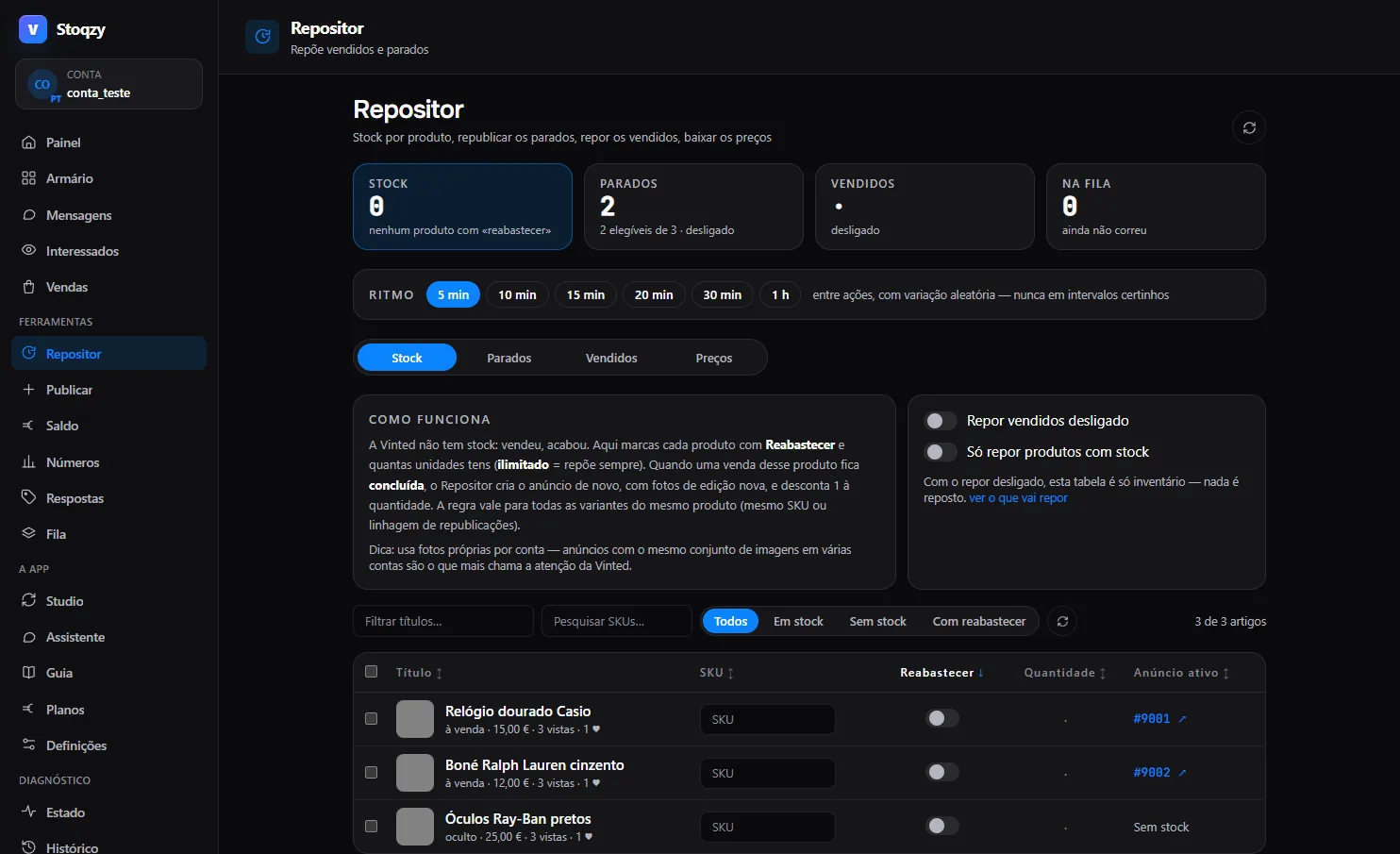
The Restocker Stock tab: a table with title, SKU, a Restock switch, quantity and active listing, with the pace between actions chosen at the top
Fig. 6 Restocker, Stock tab, before setting anything up: each item with its SKU, the Restock switch and the quantity.
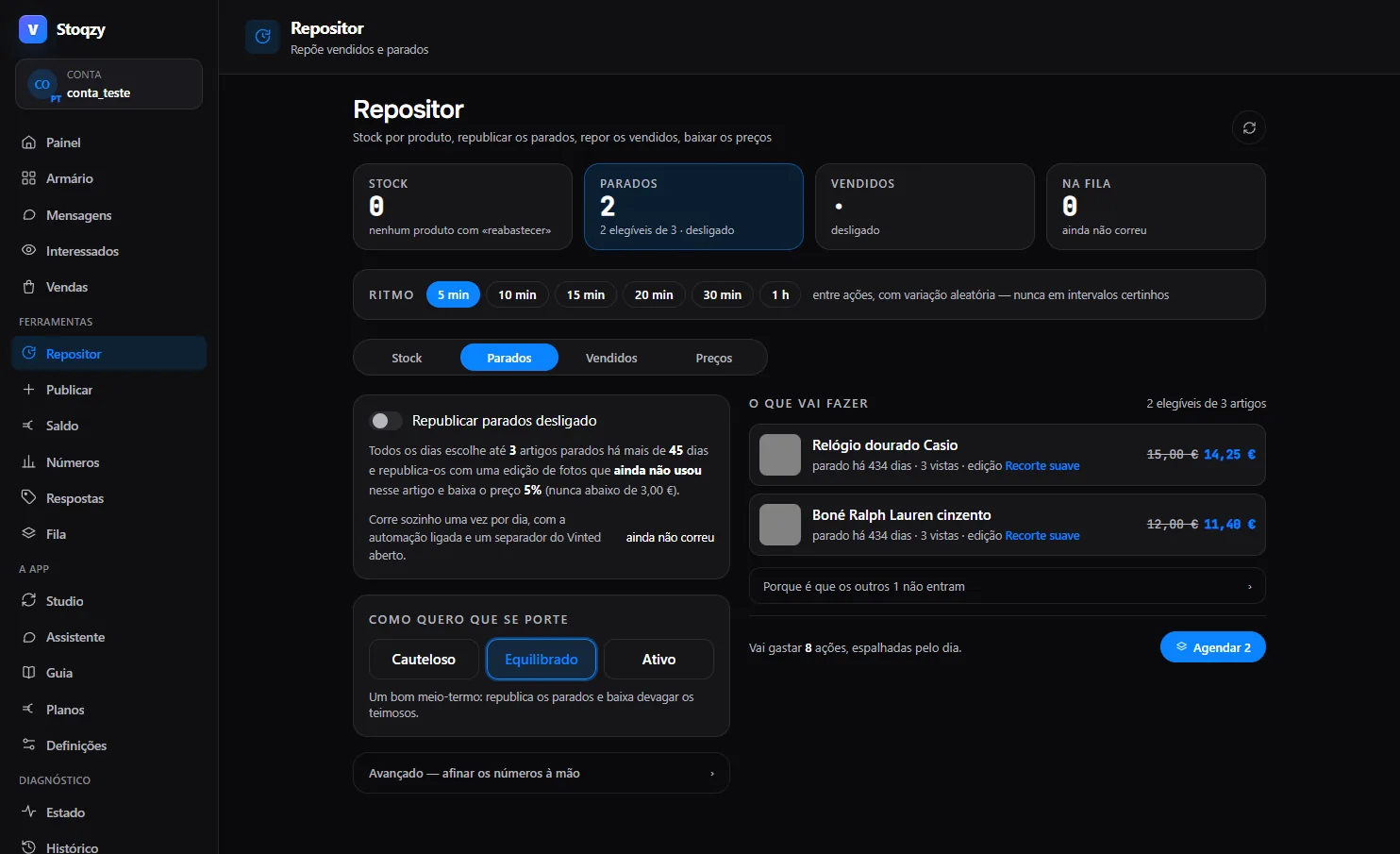
The Restocker Stale tab: picks up to 3 items stale for more than 45 days each day, relists them with a fresh photo edit and drops the price by 5 per cent, never below 3 euros; Cautious, Balanced and Active modes
Fig. 7 Stale. Up to 3 a day, stale for more than 45 days, 5% lower and never below €3.00; a fresh photo edit on each one.
1.3

Messages, interested buyers and offers

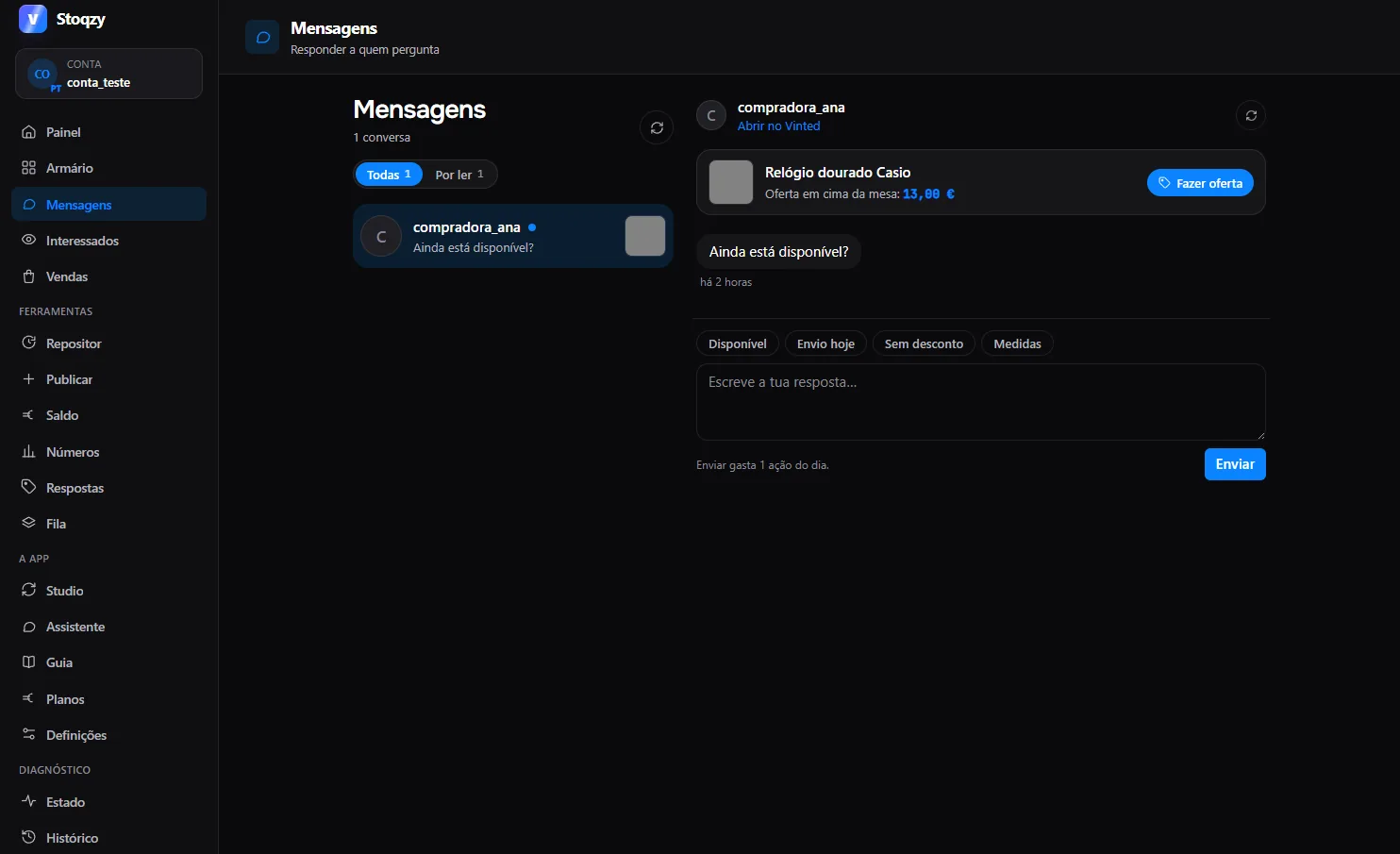
Your conversations in a simple master and detail, saved replies so you don't type the same thing twenty times, and offers sent from the same window. In Interested you see who added each piece to their favourites, and with one click you send them a human message with the discount you choose.

Every message goes through the queue and the human pace. Before the queue existed, a test that fired messages one after another got our test account restricted. The mandatory pace was born right there, and since then every message waits its turn.

Fig. 8 A saved reply dropping into the field; you still click send yourself.animation
Stoqzy Messages: the list of conversations on the left and the open conversation on the right, with saved replies and an offer button
Fig. 9 Messages. Conversations on the left, the open one on the right, saved replies and offers in the same place.
1.4

Figures: an honest portrait of the wardrobe

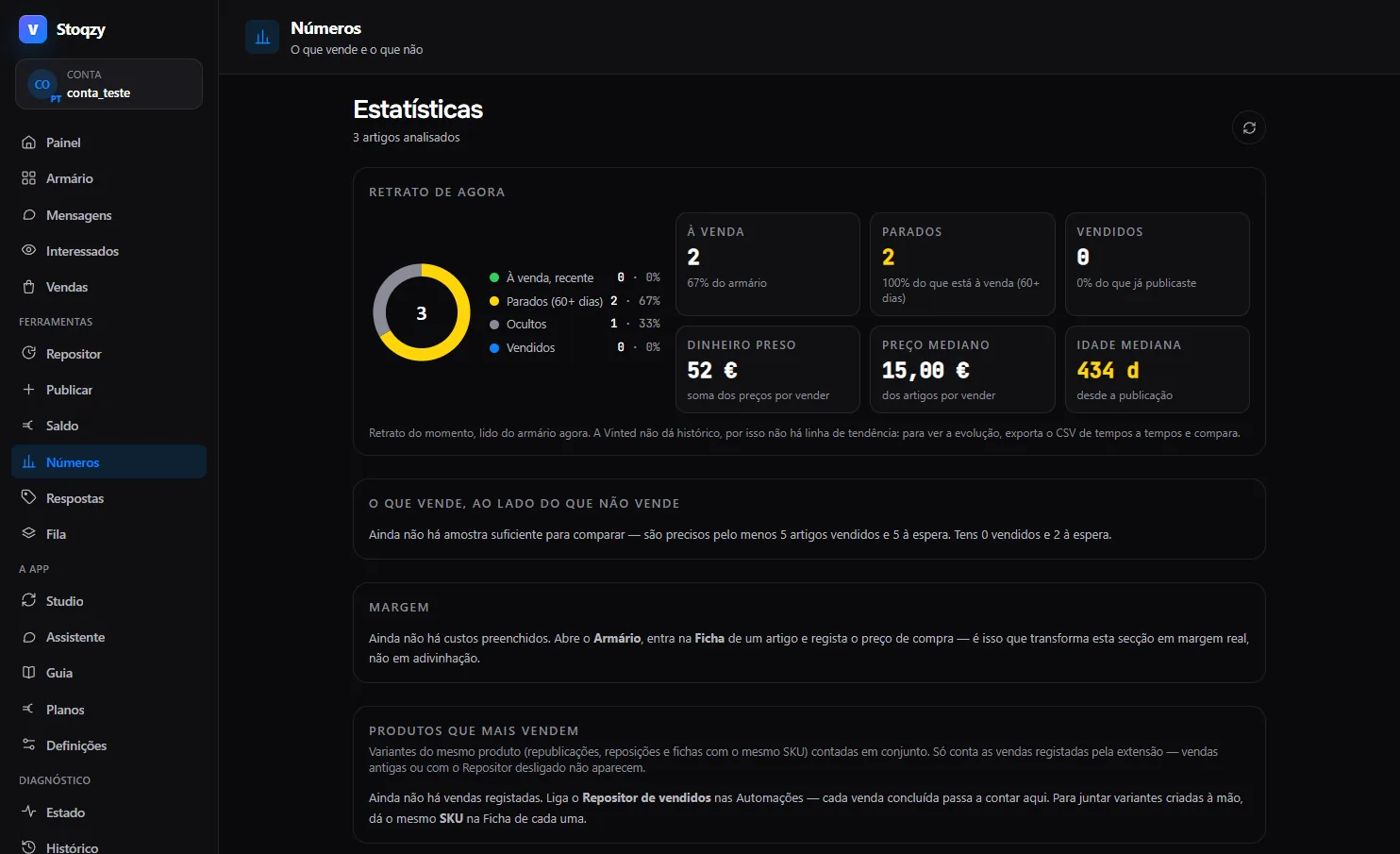
How much money is tied up, for how long, and which brands tie up the most. Vinted gives you no history, so Stoqzy doesn't draw fake trends: it shows the portrait of right now and lets you export the CSV to compare later.

It was by looking at these figures that we worked out, in our own wardrobe, that half the stock was sitting still and the prices were far too high. The Restocker and the price drops came from that.

Stoqzy Figures: a donut with items on sale, stale and hidden, €52.00 tied up, a median price of €15.00 and a median age of 434 days
Fig. 10 Figures. Money tied up, median price, median age of the listings.
1.5
Sales
The state of each sale, the shipping label in one click, mark as packed, export to CSV.
1.6
Balance
Available and pending, without opening the Vinted wallet.
1.7
Queue
Everything that's going to run, in order, at the pace you set. You see what's scheduled and you stop it whenever you want.
1.8
Automations
One place to switch on and off the Restocker, the price drops and accepting offers within your minimum. Everything starts switched off.
1.9
New listing
Create a new listing from one of your own listings used as a starting point, with description templates and the photos already treated, filled into the Vinted form as if it were you.

02 · How it works

Three steps, and not one of them asks for your password.

You install the extension

You ask for access, you get the file and you load it in chrome://extensions. You open Vinted with the account you already use. Stoqzy uses that session, just like you do when you browse.

You fill in what only you know

Cost, SKU, where it's stored, how many units you have. It's ten minutes of work with the CSV, and it's what turns “price” into “margin”.

You switch on what you want, and it waits its turn

Restocker, price drops, accepting offers. Every action joins the queue and comes out with a gap and some variation, inside the active hours you set. If Vinted shows a block, it stops and tells you.

03 · Safety and pace

Your account is worth more than the rush.

This is why Stoqzy exists. Read both columns: what it does and what it refuses to do count for just as much, and none of these rules can be switched off.

What it does

  • SessionIt runs in your browser, with your session. There is no server of ours talking to Vinted. The calls leave from your own page, as if you were the one clicking.
  • PaceA human pace, and it's compulsory. Caps per hour and per day, a pause between actions with random variation, and active hours you set yourself (9am to 11pm out of the box). Outside them the queue waits.
  • ProfilesSeveral accounts on the same computer don't wake up at the same time. Each profile starts its active hours with its own fixed delay of up to 45 minutes. Dozens of accounts relisting at 09:00 on the dot from the same IP don't look like people.
  • CaptchaIt stops at the first block and tells you. The queue stays still until you decide.
  • DuplicatesRelisting creates the new one and hides the old one in the same operation. Two open tabs don't create two listings: only one of them can claim each task.
  • DataRecords, costs and settings stay in your Chrome. You export the lot to CSV whenever you want.
  • Currency21 Vinted countries, with each item's price handled in that item's own currency.
  • When it changesIf Vinted changes the API, the extension spots the drift and switches off the affected action instead of writing blind.

What it refuses to do

  • It doesn't solve captchas, it doesn't get around anti-bot protection, it doesn't change IP. If Vinted says no, then it's no.
  • It doesn't ask for your password, doesn't see it and doesn't store it.
  • It doesn't fire messages one after another. Each message to an interested buyer takes a click from you, and it joins the queue.
  • There's no “fast mode” button. The pace caps can't be switched off.
  • It doesn't delete listings. It only does what we've already confirmed in real traffic, and deleting isn't confirmed yet; relisting hides the old one.
  • It doesn't restock everything you've ever sold. Restocking sold items has a cut-off date: only the sales from the day you switch it on.
  • It doesn't promise that Vinted will never restrict you. What it does promise is that, if that happens, it won't have been a burst of ours.
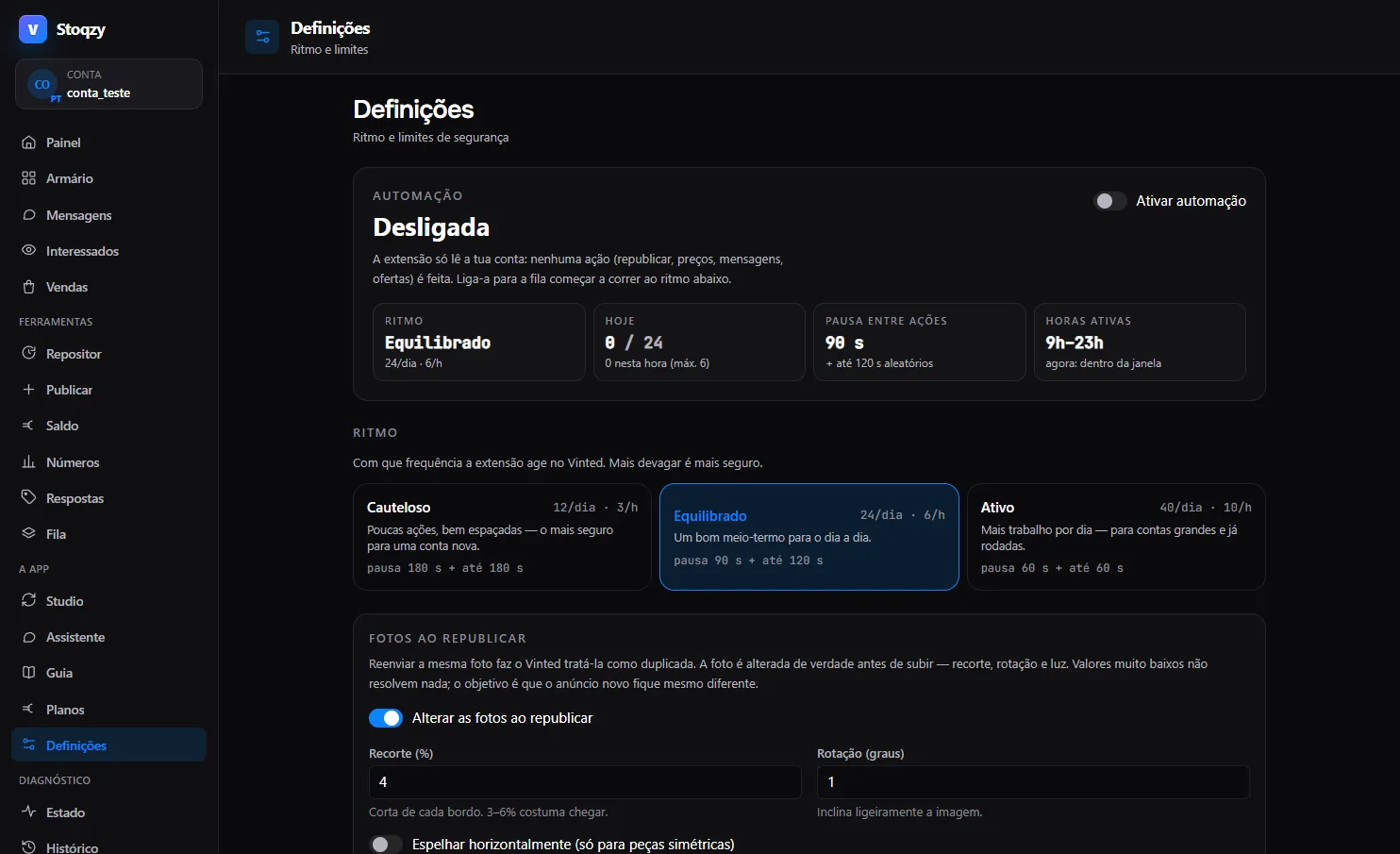
Stoqzy settings: automation off, Balanced pace with 24 actions a day and 6 an hour, a 90-second gap between actions plus up to 120 at random, active hours 9am to 11pm, and the Cautious, Balanced and Active modes
Fig. 11 Settings. Balanced pace: 24 a day, 6 an hour, a 90 s gap plus up to 120 s at random, active hours 9am to 11pm. You can tighten the caps further; you can't go past the maximum in the code (60 a day, 12 an hour, 45 s between actions).
Fig. 12 Five actions in a day, at irregular intervals, one rest, and the stop at the captcha.animation

One queue, for example

relist stale items5 items
gap90 s + up to 120 s at random
rest12 min every 4 actions
active hours09:00 to 23:00
cap for today24 actions (max. 60)
captcha detectedstop and tell you

An account that does a hundred things in a minute doesn't look like a person, and Vinted knows it. The three modes (Cautious, Balanced, Active) change the caps per day and per hour, the distance between actions and the rest between bursts; the maximum in the code (60 a day, 12 an hour) and the stop at a captcha are always there.

04 · Stoqzy Studio · Team plan

When there are a lot of accounts, you need a workbench.

The extension handles one account at a time. The Studio is the panel where you see them all: balance, sales and stock per account, the shipping queue with custom labels, product templates to list across several accounts, and AI-suggested replies that you approve before sending. It runs at studio.stoqzy.com: every customer has their own API key and their data stays isolated from everyone else's.

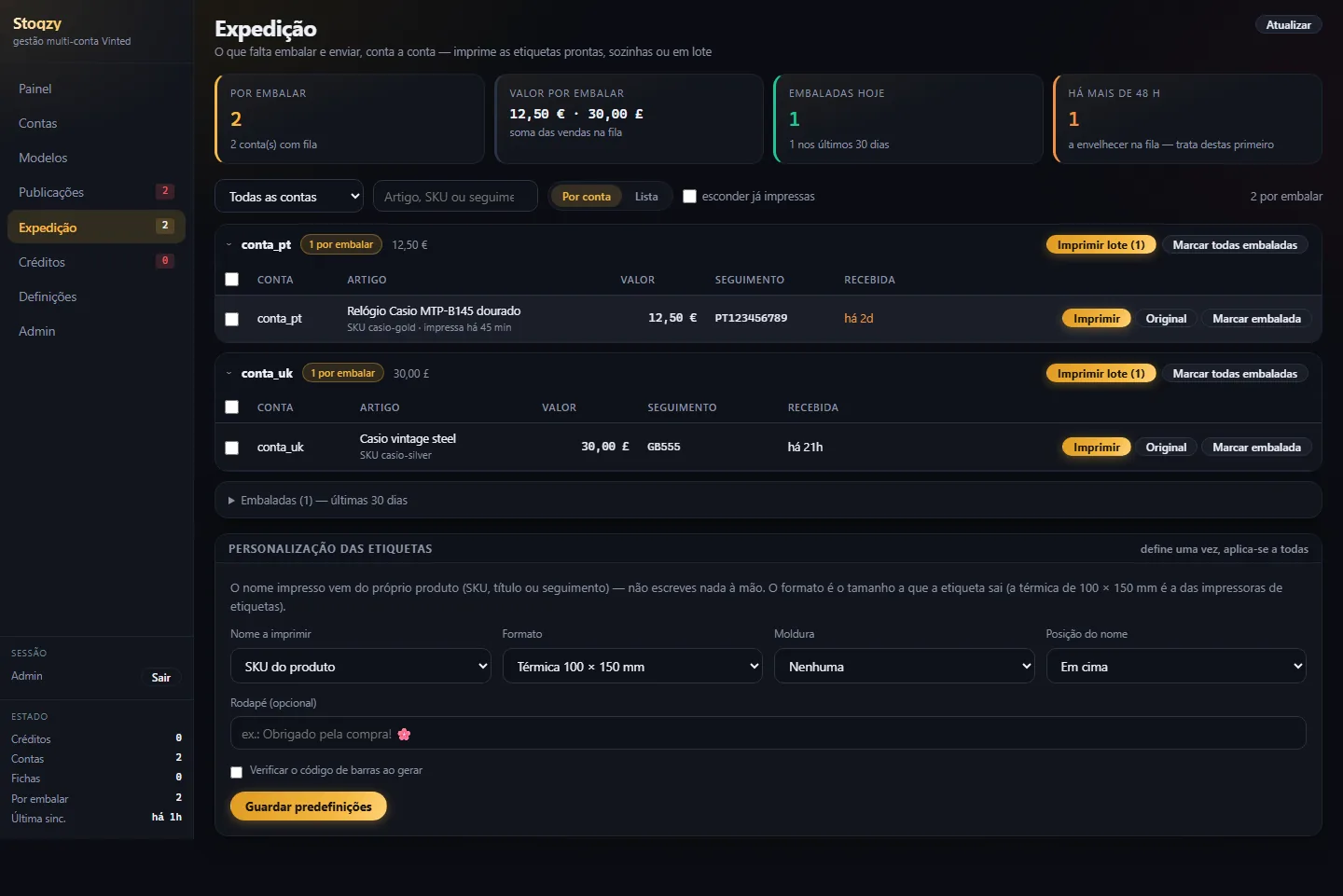
Shipping in Stoqzy Studio: sales still to pack grouped by account, with value, tracking number, Print and Mark as packed buttons, and the label customisation with the name to print, thermal 100 by 150 mm format and a footer
Fig. 13 Shipping. What's left to pack, account by account; the labels come out with the SKU printed, in a batch, in a single PDF.studio.stoqzy.com
  • aAccounts side by sideAvailable and pending balance, sales from the last 30 days and stock for each account, in one table. In euros and in pounds, each one in its own currency.
  • bShipping in batchesThe labels come out with the name you choose (SKU, title or tracking), on thermal 100 × 150 mm or another format, together in one PDF. The ones older than 48 h come first.
  • cProduct templatesOne template, several accounts. You pick which accounts to list on and the Studio keeps the queue, with the Vinted taxonomy (category, size, condition, colours) already in the record. Automatic listing by each account's extension is in testing on our own account and gets switched on when it passes; until then, the template opens in the extension's New listing screen and goes out at the normal pace.
  • dAI replies, approved by youIn the conversation, a button asks for a suggested reply with the item record as context, in the account's language. You read it, correct it if you want, and you send it yourself. Each suggestion costs 1 credit; with no credits, it warns you and spends nothing.

Labels carry buyers' addresses. That's why every customer signs in with their own key, sees only their own accounts, and the PDFs are generated on the spot and never stored. We don't sell or share this data with anyone.

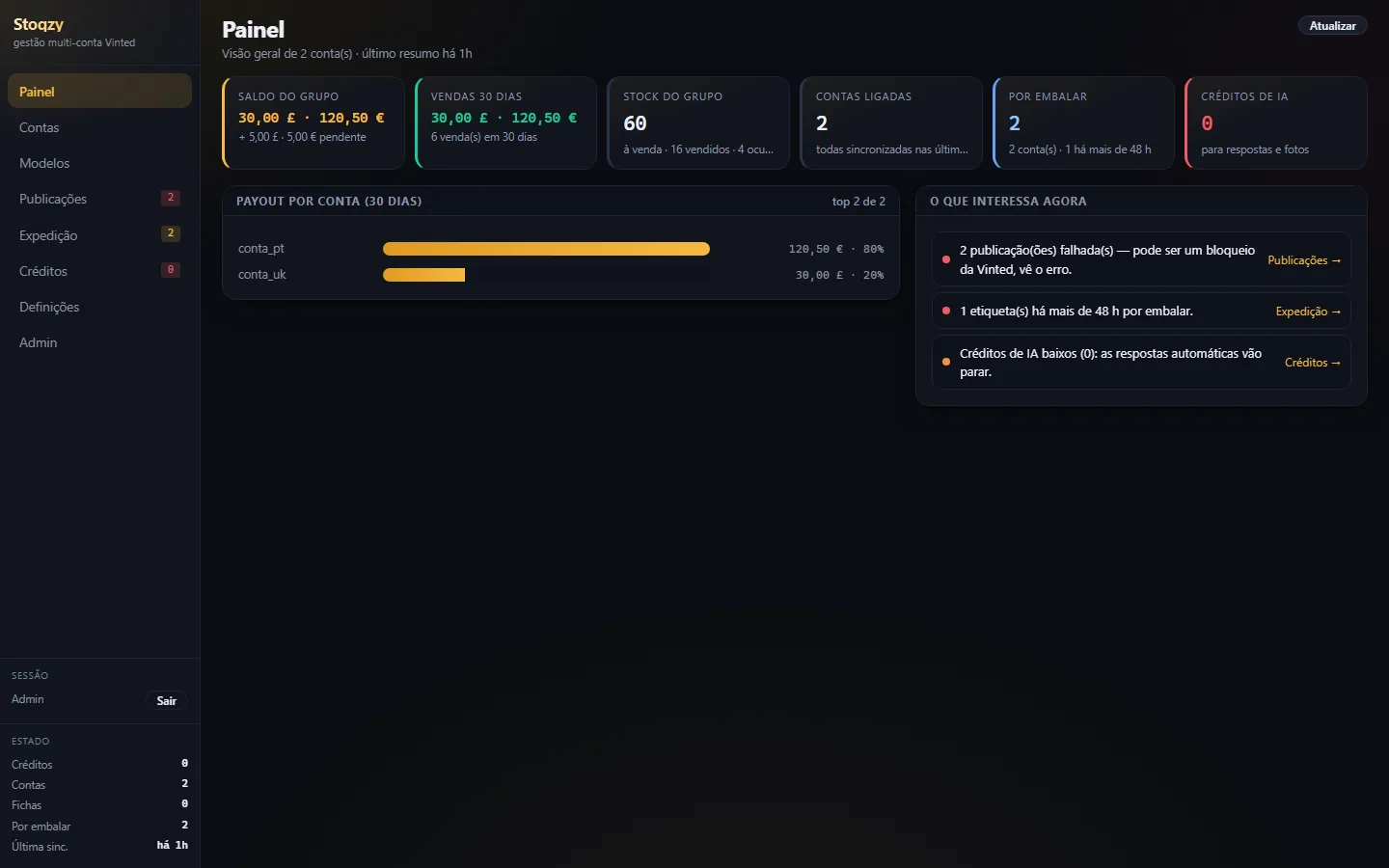
The Stoqzy Studio dashboard: the group's balance in pounds and euros, sales over 30 days, group stock, connected accounts, items to pack, AI credits, and the list of what matters right now
Fig. 14 The Studio dashboard. Two accounts, one in euros and one in pounds, and what needs attention today.
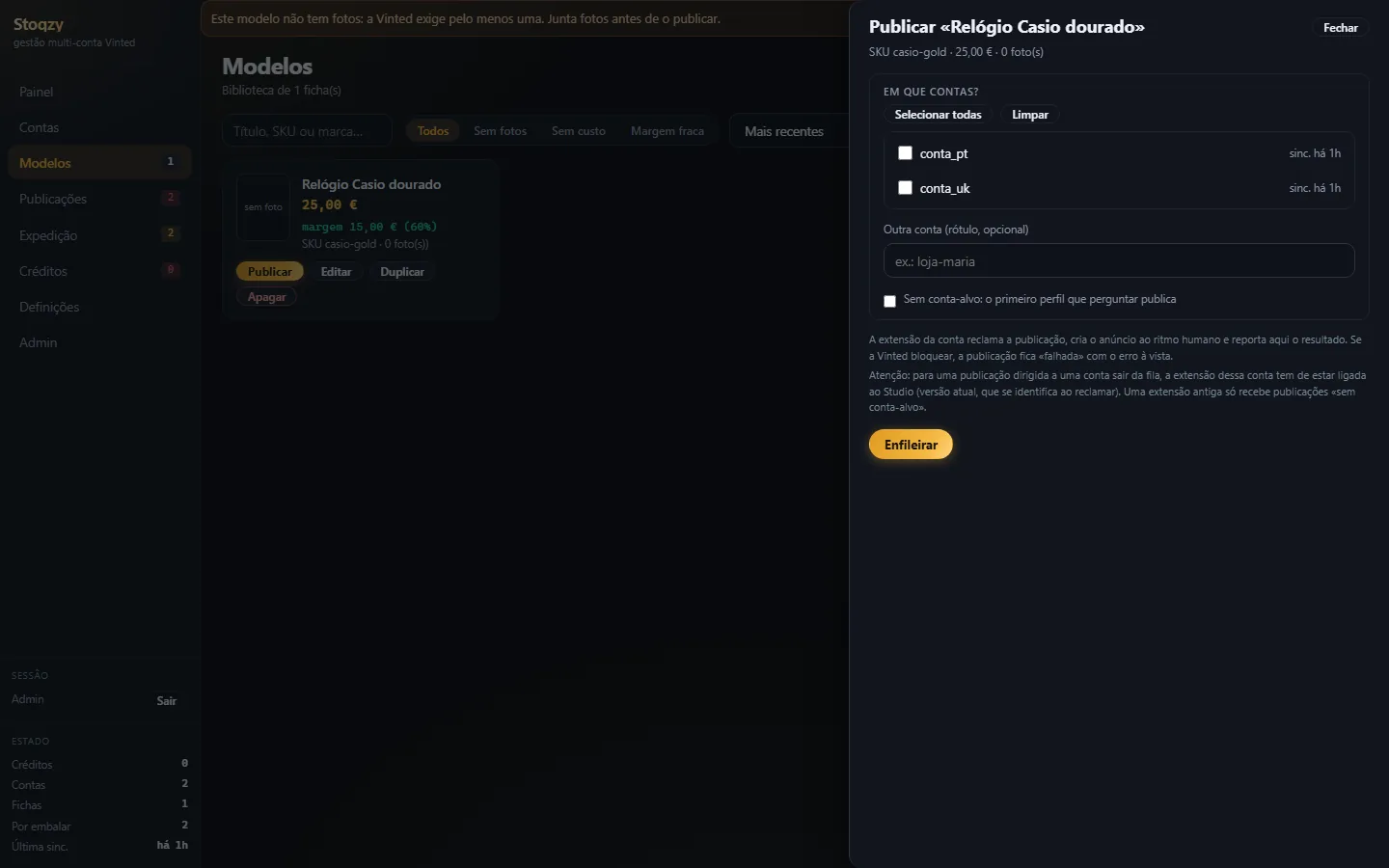
Studio templates with the Publish drawer open: choosing the accounts to list the template on and queueing it
Fig. 15 Templates. One product (still without a photo, hence the warning), the accounts you want it listed on, and “Add to queue”. Automatic listing is in testing.
Fig. 16 Accounts side by side, totals per currency, and six labels coming out in a single PDF.animation

05 · Pricing

Three plans, monthly, no lock-in. For now, activated by email.

You start on the free plan and move up when the wardrobe asks for it. You ask by email, you get the key and we agree the monthly billing with you; automatic payment on the site comes next. If you cancel, you go back to free and you don't lose your records or your history.

PlanPriceIncludesLimitsRequest
Free

For seeing your wardrobe with the margin next to the price and replying to people.

€0
  • Wardrobe (cards and table)
  • A record per item and the real margin
  • Messages and saved replies
  • Sales and labels
  • New listing
  • Relisting, Restocker and price drops
  • Offers, photo editor, Figures
unlimited Vinted accounts
3 actions a day, per account (edit, hide, list)
Request free access
Pro

For an account that wants to run on its own, at the right pace.

€9.99/month
  • Everything the extension does
  • Relist stale items and put sold ones back
  • Restocker with stock per product
  • Price drops with a floor
  • Interested buyers and offers
  • Photo editor (12 styles) and 20 relisting profiles
  • Figures
unlimited Vinted accounts
60 actions a day, per account
Get Pro
Team

For anyone running several accounts and packing every day.

€29.99/month
  • Everything in Pro, on every account
  • Stoqzy Studio (studio.stoqzy.com, your own key)
  • Shipping with labels in batches
  • Multi-account product templates (queue in the Studio; automatic listing in testing)
  • AI-suggested replies, on credits
unlimited Vinted accounts
60 actions a day, per account
Studio: up to 25 accounts in the panel; more than that, talk to us
Talk to us

An “action” is a write to Vinted made by Stoqzy: listing an item, editing a price, hiding a listing, relisting, putting a sold item back, dropping a price, sending an offer. Reading the wardrobe, checking sales or replying to a message yourself doesn't count. On Free, the 3 actions cover editing, hiding and listing; relisting, restocking and price drops belong to Pro. Inside the cap, the pace between actions is still human. To ask for any plan, write to ola@stoqzy.com with the plan name in the subject.

06 · Questions

What people usually ask before installing.

If yours isn't here, write to ola@stoqzy.com. The person who wrote the code answers.

Is it safe for my account?

That's the reason Stoqzy exists. Every write goes through caps per hour and per day, a gap with variation and active hours, and at the first sign of a block or a captcha the queue stops and tells you. There is no “fast” mode. Even so, no tool can promise that an account will never be restricted: what we promise is to do nothing that a careful person wouldn't do.

I use browser profiles (GoLogin, Multilogin) for several accounts. Does it work?

Yes, that's how the author runs his own accounts: one profile per account and the extension installed in each one. The extension only talks to the account open in that profile, and each profile starts its active hours with its own delay, so they don't all wake up in the same minute. To see every account in a single panel there's the Studio, on the Team plan.

Do you need my Vinted password?

No. The extension runs in your browser and uses the session you already have open. It never asks for your password, never sees it and never stores it.

Does relisting duplicate my listings?

No. Relisting creates a new listing and hides the old one in the same operation; the record, the costs and the history move across to the new listing. A sold item goes back up as soon as the sale shows up (or only once it's completed, if you prefer). Vinted doesn't relist the item from a cancelled sale on its own, and the cancellation needs you to accept it, so the duplicate never appears without you knowing.

Do I lose the favourites and the views when I relist?

Yes. The new listing starts from zero, and that's exactly why it goes back to the top of the searches. That's why the Restocker only relists what has been stale for more days than you set (45 by default); whatever is selling stays put.

Does Vinted recognise a repeated photo?

It might. That's why each relist goes out with one of 20 editing profiles it hasn't used on that item yet, and when the profiles run out the extension warns you instead of repeating one. On Studio accounts we recommend using your own photos on each account.

Does it work in my country?

Yes, in all 21 Vinted markets, with the right currency for each item. The United Kingdom, Ireland, Spain, France, Germany, Italy, Portugal, Poland and the rest.

Where does my data live?

The records, costs and settings stay in your browser's storage, and you export the lot to CSV whenever you want. On the Team plan, the sales, the balance and the labels of the connected accounts move to the Studio, at studio.stoqzy.com, isolated by customer key; only your browser keeps talking to Vinted.

Is it on the Chrome Web Store?

Not yet. You ask for access by email, you get the extension file and you load it in chrome://extensions. We'll tell you when it's published.

How do I get the updates?

By email, with the new file. You swap the extension folder for the new one and click “Reload” in chrome://extensions. The records, the costs and the settings stay where they were.

How do I pay for Pro and Team?

We agree it by email when you ask for the plan, month by month. The site stores no cards and no payment details.

Can I cancel whenever I want?

Yes. The plans are monthly and with no lock-in; while the billing is agreed by email, you cancel with an email. When you cancel, you go back to free and you carry on seeing the wardrobe, the sales and the margin.

And what doesn't it do yet?

It doesn't delete listings (we haven't confirmed that write in real traffic yet), it doesn't get around captchas or anti-bot protection, and it doesn't do your accounting. Whatever isn't confirmed yet is marked “not enabled” inside the extension, instead of us pretending it works. Every change goes through 1,900 automated tests before it reaches you.

Get started

Ask for access, fill in the costs, and let the queue get to work.

The free plan shows you the wardrobe with the margin next to it and your sales, with no card. Tell us how many accounts you have and which country you're in, and you get the file with the instructions.